Disable Windows To How Defender
I additionally observed the steps ('disabled' the flip off windows defender) but plainly windows defender doesn't seem to live on. if i restart or activate the pc, the home disable windows to how defender windows defender icon is no longer displayed on the machine tray (i set this to constantly show) and i get a notification proper above the device tray (coming from the bottom proper facet) within mins after beginning windows that i. Choose the begin button > settings > update & safety > windows safety and then firewall & network protection. open home windows safety settings; pick out a network profile. beneath microsoft defender firewall, switch the placing to on. if your tool is hooked up to a network, community coverage settings would possibly save you you from finishing those steps.
Microsoft has integrated windows defender, the anti-malware software program, in home windows 10/eight/7/vista, and at the same time as it is easy to turn off or disable windows defender, it is not feasible to uninstall home windows. Re-permit windows defender while needed. if making a decision which you want to re-allow windows defender in the destiny, do the following: cross back to the windows defender folder in registry editor. click once the "home windows defender" folder. open the "disableantispyware" price with the aid of double-clicking it. exchange the "cost statistics" from 1 to 0.
How to enable or disable home windows safety in windows 10 the windows safety app is a customer interface on windows 10 model 1703 and later that makes it's miles less difficult to be able to view and manage the security protections you pick out and higher recognize the safety features already protecting you to your windows 10 tool. windows security has seven areas that defend your tool and permit you to. Observe these steps to quickly flip off actual-time antivirus protection in windows protection. but, keep in mind that if you do, your device can be susceptible to threats. choose begin > settings > update & safety > windows safety > virus & hazard safety > manage settings (or virus & chance protection settings in preceding variations of. Pick the start button > settings > replace & safety > home windows protection and then firewall & network protection. open home windows disable windows to how defender protection settings; pick out a network profile. beneath microsoft defender firewall, switch the putting to on. if your device is connected to a network, network policy settings might prevent you from completing those steps.

[tip] how to disable home windows defender smartscreen filter in windows 10 "smartscreen filter out" is a feature of windows 8, home windows eight. 1 and windows 10 running structures which has been carried out to enhance protection and safety of your laptop. it mechanically assessments web sites, applications, apps and documents for malicious content material and warns the consumer if it unearths some thing unrecognized or suspicious. Re-enable home windows defender whilst wanted. if you decide that you need to re-enable windows defender inside the future, do the following: pass again to the home windows defender folder in registry editor. click on as soon as the "home windows defender" folder. open the "disableantispyware" price with the aid of double-clicking it. trade the "price information" from 1 to zero. If you unselect home windows defender by means of itself under the windows defender capabilities segment, you'll be triggered to get rid of the interface alternative gui for windows defender. home windows defender av will still run normally without the person interface, however the user interface can't be enabled if you disable the core windows defender characteristic.
Home Windows Recuperation Records Recuperation Windows Blueblack Screen Networking Troubleshooting
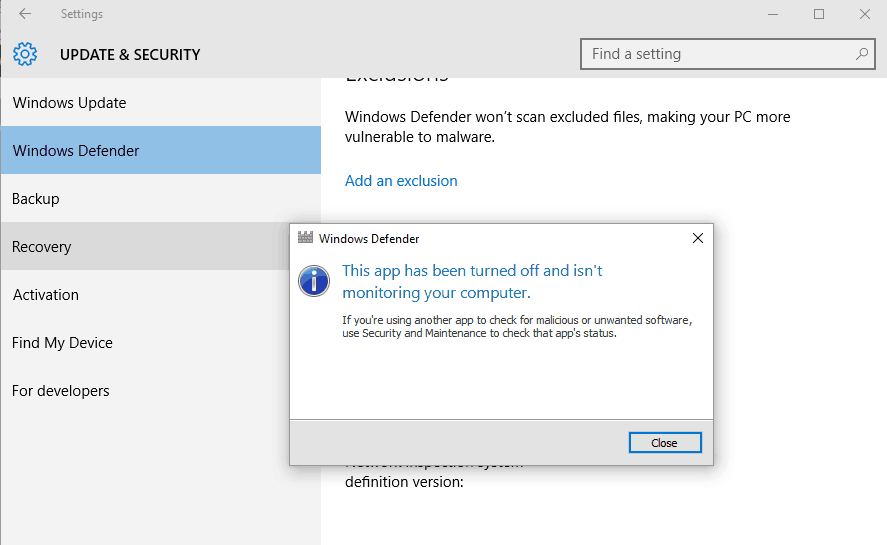
Once the coverage is created, proper click on at the coverage and click edit. this will bring up the organization coverage control editor. navigate to laptop configuration > administrative templates > home windows components > home windows defender.. look for the coverage putting “flip off home windows defender“. right click on on the policy placing and click edit. I also observed the steps ('disabled' the turn off home windows defender) but it seems that home windows defender doesn't seem to stay on. if i restart or activate the pc, the windows defender icon is now not displayed at the device tray (i set this to continually show) and i get a notification proper above the gadget tray (coming from the bottom proper facet) within mins after starting home windows that i. In windows 10, visit settings > replace & protection > windows defender, and flip off the “actual-time protection” alternative. in windows 7 and eight, open home windows defender, head to options > administrator, and flip off the “use this program” choice. windows defender is a. Consequently, home windows doesn’t allow you to uninstall home windows defender on home windows 10, but with the above method, you can as a minimum disable it. alternatively, if you had a change of heart, the windows.
How to uninstall, disable, and put off windows defender.
Consequently, home windows disable windows to how defender doesn’t can help you uninstall windows defender on windows 10, but with the above method, you could at the least disable it. however, in case you had a exchange of coronary heart, the home windows. On home windows 10 seasoned, you may configure a policy the usage of the neighborhood organization coverage editor to disable home windows defender antivirus permanently. however, you need to disable the system's "tamper safety. Modifying the registry to disable home windows defender. regrettably, home windows 10 makes it hard to shut off windows defender completely. modifying the registry is one legitimate technique of disabling home windows defender, however it desires to be executed with intense care. also, continually perform a full backup of your gadget before attempting to edit the registry. In home windows 10, go to settings > replace & safety > home windows defender, and turn off the “actual-time safety” alternative. in home windows 7 and eight, open home windows defender, head to options > administrator, and flip off the “use this program” option. windows defender is a.
Turn off or disable home windows defender. 1) release run with the aid of pressing win + r on your keyboard. 2) kind in regedit at the run window and click on on good enough 3) click sure on the uac spark off to maintain. it fixing windows replace mistakes 0x80070643 manually update windows defender to restoration replace screw ups kb2267602 (definition 12136196 2008 restarts all of sudden with error 0x000000be; home windows 2008 the way to home windows recovery restoration home windows 10 freezes fix windows 10 s the first-class antivirus for windows 10 ? (is home windows defender true sufficient ?) do you realise how lots you share your place ? what is a tpm, and why does home windows need one for disk encryption ? how to locate
How To Show Offwindows Defender Temporarily And Completely
Turning off windows defender in home windows 10 operating machine is not an clean assignment like windows 7 os. home windows defender is the pre installed anti-virus software program in windows 10 and windows 8. 1. the program is enabled by using default at the very beginning, and till you put in some other anti-virus or internet protection software program for your pc, it protects your os. Follow those steps to quickly flip off real-time antivirus safety in home windows safety. but, keep in mind that if you do, your device can be liable to threats. choose begin > settings > update & safety > home windows protection > virus & hazard safety > control settings (or virus & risk safety settings in preceding versions of. Modifying the registry to disable windows defender. alas, windows 10 makes it tough to shut off home windows defender permanently. modifying the registry is one valid approach of disabling home windows defender, but it needs to be carried out with severe care. additionally, usually carry out a full backup of your machine earlier than trying to edit the registry.
On windows 10 pro, you can configure a policy the use of the neighborhood institution coverage editor to disable windows defender antivirus permanently. however, you need to disable the gadget's "tamper safety. Turn offwindowsdefender the use of the security center. the use of the safety center will disable home windows defender briefly. this means that in case your laptop appears to be at danger, windows defender can flip itself returned on routinely. 1. click on for your home windows begin menu. it's the windows logo positioned inside the backside left of your screen. 2. select.
Flip off home windows defender the use of the security middle. the use of the security center will disable windows defender temporarily. which means that in case your computer disable windows to how defender appears to be at danger, home windows defender can flip itself lower back on routinely. 1. click on in your home windows begin menu. it's the home windows emblem located in the backside left of your display screen. 2. pick. contents famous posts: smlogsvcexe defender ? in case you mounted home windows antispyware (beta) pri accelerometerst
Microsoft has incorporated home windows defender, the anti-malware software, in windows 10/8/7/vista, and at the same time as it is straightforward to turn off or disable home windows defender, it is not feasible to uninstall windows. on servers so request you please help in a way to disable usb on servers additionally regards, saurabh proportion nigel commented on home windows 10 1809 kiosk mode with an advert area


Komentar
Posting Komentar